



Educational Alliance Art School – Open Studio Registration for Enrolled Students
Open Studio registration may look a little different. Here is how to sign up:
Step 1:
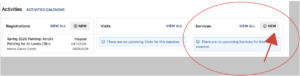
Please note that the Open Studio registration process has changed. You can view all Open Studio offerings here: Open Studio for Enrolled Students. When you log in to your account, navigate to the box that says “Services” on your Dashboard. You will select “View All” to see your current open studio registrations or select “+New” to create a new open studio registration.
Step 2:
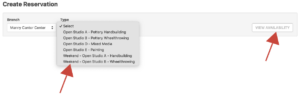
Step 3:
This takes you to the calendar. Choose the date you want to attend. Sessions are available one week in advance. Choose your start time. Please note that start/end times have changed for pottery on Friday, Saturday, and Sunday. To the right of the start time, you must choose the duration of your open studio session.
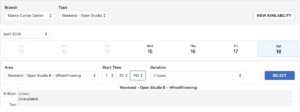
Open Studio Sessions are divided into 2-hour, 2-hour 30-minute, and 3-hour sessions. You can find the calendar showing the length of each open studio here.
To finish, select the box next to your name and choose “Done” and then “Add to Cart.” This will bring you to another page, and you will choose “Checkout.”
